Categorías
Último blog
Una cerradura inteligente es una cerradura electrónica que le permite abrir y gestionar una puerta con algo más que una llave metálica tradicional. Dependiendo del modelo, puede utilizar una huella dactilar, un código PIN, una tarjeta RFID, una aplicación móvil, una conexión Bluetooth o una llave mecánica de respaldo.
Para muchas personas, el atractivo es sencillo: menos llaves que llevar y más control sobre quién puede entrar. Pero una cerradura inteligente no es solo un teclado conectado a una puerta. Combina un mecanismo de cierre, un método de autenticación, gestión de energía y, en los modelos conectados, controles de acceso que pueden gestionarse desde un teléfono.
Esta guía explica qué es una cerradura inteligente, cómo funciona, qué sucede cuando la batería se agota y qué comprobar antes de elegir una.
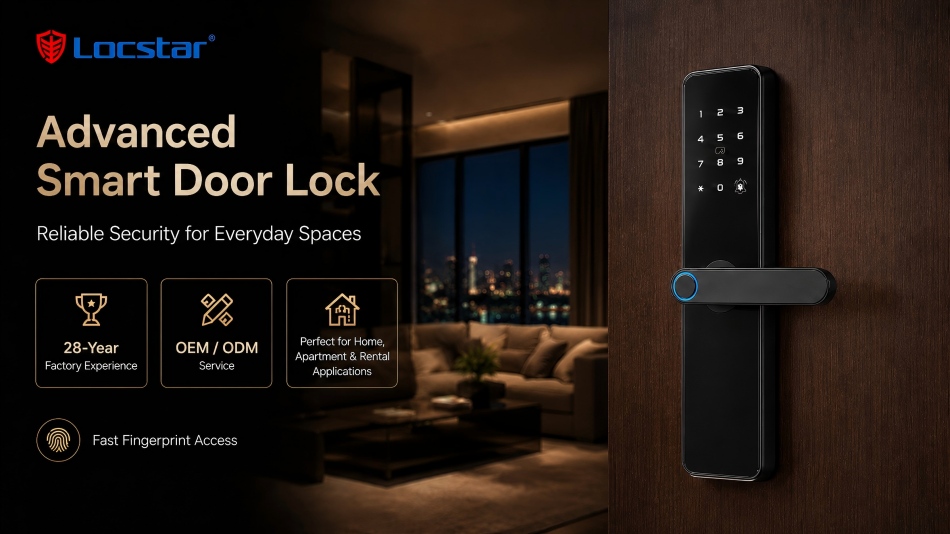
Una cerradura inteligente es una cerradura que utiliza credenciales electrónicas para verificar a un usuario antes de permitir que la puerta se abra. En lugar de depender solo de una llave metálica cortada, la cerradura puede reconocer una huella dactilar registrada, un código válido, una tarjeta o un comando desde una aplicación autorizada.
La palabra "inteligente" suele referirse a un mayor control y conectividad. Una cerradura digital básica puede funcionar con un PIN o una huella dactilar en la puerta. Una cerradura inteligente conectada también puede permitirle gestionar usuarios, crear códigos temporales, ver registros de acceso o controlar la cerradura de forma remota cuando el modelo admite una puerta de enlace o conexión a internet.
| Término | Lo que suele significar |
| Cerradura tradicional | Se abre principalmente con una llave física. |
| Cerradura digital | Utiliza métodos electrónicos como un PIN, una tarjeta o una huella dactilar. |
| Cerradura inteligente | Añade gestión de acceso digital y puede admitir aplicaciones, Bluetooth, Wi-Fi o funciones remotas. |
| Sistema de cerradura inteligente | Una cerradura más dispositivos de soporte como una puerta de enlace, aplicación, tarjetas, software o plataforma de control de acceso. |
No todas las cerraduras inteligentes tienen todas las funciones. Por ejemplo, algunos modelos están diseñados para acceso local por Bluetooth, mientras que otros incluyen Wi-Fi, funciones de video, múltiples métodos de usuario o integración con un sistema de hogar inteligente más amplio.
La tecnología puede parecer complicada, pero el proceso básico es fácil de entender. En la mayoría de los casos, la cerradura sigue cuatro pasos.
| Paso | Qué sucede |
| 1. Autenticación | Usted presenta una huella dactilar, introduce un PIN, acerca una tarjeta, utiliza una aplicación o emplea otro método aprobado. |
| 2. Verificación | La cerradura comprueba si la credencial está registrada y permitida. |
| 3. Desbloqueo | El mecanismo interno libera o acciona el pestillo, el cerrojo, la cerradura de embutir o el sistema de cilindro. |
| 4. Gestión | Algunos modelos registran el evento, envían una notificación o actualizan el registro de acceso. |
Por ejemplo, cuando coloca un dedo registrado en una cerradura inteligente con huella dactilar, el sensor lo compara con los datos de huella almacenados. Si coincide, la cerradura activa su motor interno o mecanismo electrónico y permite que la puerta se abra.
Cuando utiliza un teléfono, el Bluetooth se utiliza a menudo para el acceso cercano. El teléfono y la cerradura se comunican a corta distancia, y la cerradura verifica que el teléfono tenga una llave digital válida. El desbloqueo remoto normalmente requiere una puerta de enlace conectada a internet o una conexión Wi-Fi, dependiendo del diseño del producto.
El mejor método de acceso depende de quién utilice la puerta y con qué frecuencia necesite entrar.
El acceso por huella dactilar es conveniente para hogares familiares porque no hay nada que llevar ni recordar. Los códigos PIN funcionan bien para invitados, personal de limpieza, contratistas o visitantes de corta estancia. Las tarjetas y llaveros RFID son comunes en oficinas, apartamentos y hoteles porque son fáciles de emitir y reemplazar.
Las aplicaciones móviles pueden ofrecer más control. Un usuario puede ser capaz de añadir o eliminar accesos, establecer límites de tiempo o comprobar si se ha utilizado una puerta. Algunas cerraduras también admiten desbloqueo por Bluetooth, asistentes de voz o relojes inteligentes.
Una buena regla práctica es elegir más de un método de acceso. Una huella dactilar, un código PIN, una tarjeta y una llave mecánica de respaldo pueden proporcionar flexibilidad cuando un método no está disponible.
No. Muchas cerraduras inteligentes funcionan sin Wi-Fi.
Una cerradura inteligente Bluetooth generalmente puede desbloquearse localmente cuando su teléfono está cerca. Las funciones de huella dactilar, PIN, tarjeta y llave mecánica también suelen funcionar en la puerta sin una conexión a internet. El Wi-Fi o una puerta de enlace son necesarios principalmente para funciones como el desbloqueo remoto, alertas en tiempo real, gestión remota de usuarios y registros de acceso basados en la nube.
Antes de comprar, pregunte qué funciones siguen funcionando sin conexión. Esto es importante porque "inteligente" no siempre significa "siempre conectado". Por ejemplo, una cerradura puede permitir el acceso por huella dactilar y PIN sin Wi-Fi, pero requerir una puerta de enlace para el control remoto.
Si la gestión remota es importante para su proyecto, compare las opciones de cerraduras inteligentes con Wi-Fi y huella dactilar cuidadosamente y confirme los accesorios necesarios.
Una cerradura inteligente puede mejorar el control de acceso, pero no hace automáticamente que cada puerta sea más segura. La seguridad general depende del cuerpo de la cerradura, el material de la puerta, la resistencia del marco, la calidad de la instalación, los permisos de usuario y el método de respaldo.
Las funciones digitales pueden ofrecer ventajas útiles. Un PIN temporal puede caducar después de que un visitante se vaya. Una tarjeta perdida puede eliminarse del sistema. El acceso puede revocarse sin tener que recoger o reemplazar cada llave física.
Sin embargo, los propietarios deben seguir manteniendo buenos hábitos de seguridad. Cree contraseñas de aplicación seguras, proteja las credenciales de administrador, elimine el acceso de antiguos usuarios y mantenga el firmware de la cerradura actualizado cuando haya actualizaciones disponibles. Evite compartir un único PIN permanente con todos los miembros de un hogar o empresa.
La mayoría de las cerraduras inteligentes para puertas funcionan con baterías y proporcionan advertencias de batería baja antes de que se agoten. La advertencia puede aparecer como un sonido, una luz, un mensaje en la aplicación o un aviso de voz.
Aun así, el respaldo de batería debe ser una prioridad de compra. Dependiendo del modelo, las opciones de respaldo pueden incluir una llave mecánica, un puerto de alimentación de emergencia, una conexión de batería externa u otro método de acceso aprobado.
No espere a una emergencia para probar el plan de respaldo. Después de la instalación, asegúrese de que cada usuario autorizado sepa cómo utilizar la llave de respaldo o el método de alimentación de emergencia de forma segura.
No todas las cerraduras se adaptan a todas las puertas. Antes de elegir un modelo, verifique el grosor de la puerta, el material de la puerta, el tipo de cuerpo de la cerradura, la posición de la manija, el retroceso (backset) y la dirección de apertura. Un cerrojo inteligente, una cerradura de embutir inteligente, una cerradura con manija inteligente y un cilindro inteligente están diseñados para diferentes situaciones de hardware.
También debe considerar dónde se utilizará la cerradura. La entrada de una casa puede necesitar acceso por huella dactilar y una llave mecánica de respaldo. Una propiedad de alquiler puede beneficiarse de códigos temporales. Un proyecto de hotel o apartamento puede requerir tarjetas, gestión centralizada, software o accesorios de control de acceso.
Explore la gama de cerraduras inteligentes para puertas Locstar después de identificar la estructura de la puerta y los métodos de acceso que sus usuarios realmente necesitan.
La mayoría de las cerraduras inteligentes que funcionan con baterías pueden seguir operando durante un corte de energía en el edificio. Las funciones remotas pueden verse limitadas si el internet del hogar o la puerta de enlace (gateway) están desconectados.
Muchas cerraduras inteligentes para puertas incluyen una llave mecánica de anulación, pero esto varía según el modelo. Confirme siempre el método de respaldo antes de realizar la compra.
Pueden ser convenientes cuando el sensor recibe el mantenimiento adecuado y los usuarios registran sus huellas dactilares correctamente. Un PIN, una tarjeta o una llave de respaldo siguen siendo útiles.
Sí. Muchos modelos permiten múltiples huellas dactilares, códigos, tarjetas o usuarios de la aplicación. El número de usuarios admitidos depende del producto.
Una cerradura inteligente para puertas funciona verificando una credencial aprobada y luego controlando el mecanismo de cierre de la puerta. La elección correcta no es simplemente la que tiene más funciones. Es la que se adapta a su puerta, admite los métodos de acceso que necesita e incluye un plan de respaldo fiable.
¿Necesita ayuda para encontrar una cerradura adecuada para su puerta o proyecto? Obtenga una recomendación de compatibilidad de cerraduras de Locstar con su tipo de puerta, cuerpo de cerradura, grosor, métodos de acceso preferidos y mercado objetivo.
 en
en es
es ar
ar lt
lt 中文
中文